


Handheld Pan Oiler Troubleshooting Guide
 View All Guides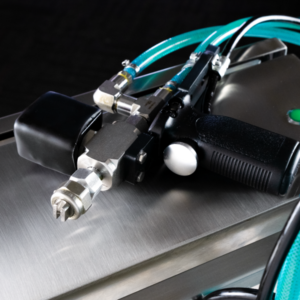
Keeping your AccuSpray Handheld Pan Oiler operating properly is essential for maintaining consistent release agent application, reducing product waste, and supporting efficient bakery production. Even small performance issues can affect spray consistency, system reliability, and overall production efficiency.
Use this troubleshooting guide to quickly identify common issues and perform basic checks before requesting service. Addressing minor problems early can help reduce downtime and keep your bakery equipment operating at peak performance.
1. Unit Will Not Turn On
If the handheld pan oiler does not power on, the issue is often related to the unit’s electrical connection or built-in safety systems. Before requesting service, verify that the system is receiving power and that all components are properly connected.
- Confirm the unit is plugged in and that the outlet is live
- Check that the unit’s circuit breaker switch is closed by confirming the switch is flipped upward and the red indicator light is on
2. Unit Turns On, But Does Not Prime
If the unit powers on but does not begin pulling release agent into the system, the issue is typically related to product flow or restrictions at the intake point. Proper fluid flow is necessary for the system to prime correctly.
- Verify the supply/return wand is fully inserted into the pail and the supply hose is submerged
- Inspect the supply hose strainer for clogs or blockage
3. Unit Runs But Does Not Spray Properly
If the system is running but spray performance is inconsistent, weak, or uneven, the issue may be caused by clogged components, trapped air within the hoses, or incorrect pressure settings. Proper spray performance depends on consistent product flow and correct operating pressure.
- Clean strainer and spray gun nozzle tip, if needed
- Clear air from lines by selecting “Constant” pattern
- Confirm the regulator is set to at least 40 psi by powering the unit off and back on, then checking pressure during the prime function
4. Spray Pattern Is Inconsistent
If the spray pattern appears uneven or inconsistent, the issue is often related to pressure fluctuations, buildup within the spray gun nozzle tip, or air trapped within the hoses. Consistent spray performance is critical for proper release agent application and product consistency.
- Inspect spray gun nozzle tip for buildup or blockage
- Verify the regulator is set to proper operating pressure (at least 40 psi)
- Check all hoses for trapped air; to purge air from the system, power the unit off and back on and allow the unit to execute the prime function
5. Oil is Leaking From Unit
Leaks can reduce efficiency, waste release agent, and create unnecessary cleanup during production. Product leakage is typically caused by loose fittings, worn hoses, or damaged components within the fluid delivery system.
- Inspect all hose connections for leaks
- Tighten fittings where needed
- Check hoses for cracks, wear, or damage throughout the system
- Check the pail for leaks or other damage
6. Low or Weak Spray Pressure
If spray pressure seems lower than normal, the system may not be operating at the proper pressure or there may be restrictions affecting product flow. Reduced pressure can impact coating consistency and overall spray performance.
- Confirm the regulator is set to at least 40 psi and adjust as needed
- Inspect supply hose and strainer for restrictions
- Check the spray gun nozzle tip for clogging
7. Unit Is Pulling In Air During Operation
Air entering the system can cause inconsistent spray patterns and interruptions in product flow. This typically occurs when the supply hose is not fully submerged or when air is entering through loose or damaged hose connections.
- Verify the supply hose remains fully submerged
- Inspect hose connections for loose fittings
- Check hoses for cracks, wear, or damage throughout the system
Need Additional Support?
If these troubleshooting steps do not resolve the issue, additional service or technical support may be required. Contact the AccuSpray team for assistance to help minimize downtime and keep your bakery operation running efficiently.
When contacting support, please include the unit model, serial number, and a brief description of the issue to help expedite service.