


Tabletop Pan Oiler Troubleshooting Guide
 View All Guides
 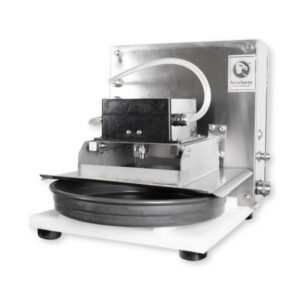 Proper operation of the AccuSpray Tabletop Pan Oiler is essential for maintaining consistent release agent application, optimizing bakery production efficiency, and ensuring reliable spray performance during daily operation. Even small interruptions in spray consistency or system performance can affect pan preparation, product quality, and overall production flow.
Use this troubleshooting guide to quickly identify common operational issues and perform basic system checks before requesting service. Addressing minor issues early can help reduce downtime and keep your bakery equipment operating at peak performance.
1. Unit Will Not Turn On
If the AccuSpray Tabletop Pan Oiler does not power on, begin by verifying the unit’s power supply and internal electrical components before requesting service.
- Confirm the unit is plugged in and that the outlet is live
- Check that the unit’s circuit breaker switch is closed by confirming the switch is flipped upward and the green indicator light is on
2. Unit Turns On and Primes But Does Not Spray
If the unit powers on and successfully initiates and completes the Prime cycle but does not spray, the issue is often related to sensor alignment or sensor function.
- Verify the pan is positioned within 0.5 mm of the proximity sensor (try touching the sensor with the pan directly)
- Test proximity sensor operation by opening the cabinet door, sliding a pan into spray position, and checking for a red illuminated LED on the inside end of the sensor (adjusting the sensor may be necessary)
- Inspect the end of the sensor for debris and clean if needed
- If sensor adjustment is needed, loosen the thread collar on both sides of the sensor, adjust as necessary, and tighten both collars once adjustment is complete
- If the sensor lights up but nothing happens, check the wire to the microcontroller for connection issues
- If the sensor still doesn’t light up, check power to the sensor connection wires
- Check that the pico microcontroller is pushed in and micro USB is fully connected
3. Unit Sprays, But Spray Is Weak or Spray Pattern Is Deformed
If the system sprays but performance appears weak, inconsistent, or uneven, the issue is commonly caused by trapped air within the system or buildup affecting the spray tip. Proper fluid circulation and a clean spray assembly are essential for maintaining consistent release agent coverage.
- Cycle the unit off and back on to purge air from the system
- Check that supply and return hoses are fully submerged in the oil reservoir
- Prime the spray head tip following setup instructions
- Remove and inspect spray tip for clogging
- Clean spray tip and strainer by soaking in warm soapy water and/or vinegar. Blow out with compressed air and use a soft brush as needed. Replace annually as needed.
- If the issue persists, inspect hoses and all connection points for air leaks and secure as needed
4. Unit Cycles But Spray Does Not Trigger
If the unit powers on and appears to cycle normally but does not activate the spray sequence, the issue may be related to fluid flow restrictions or incomplete priming within the oil circulation system. Proper oil flow is required for consistent spray activation.
- Verify oil reservoir has adequate oil supply
- Inspect supply and return hoses for blockage
- Cycle unit off and on to re-prime system
- Check spray assembly for obstructions
- Verify solenoids illuminate when the unit is in operation
5. Excess Oil Is Being Applied to Pan
If the pan is receiving more release agent than expected, product waste can increase and excessive oil buildup may affect downstream production. This issue is often related to spray timing, pressure inconsistencies, or spray tip wear.
- Inspect spray tip, tip insert, and mesh for wear or damage
- Verify spray cycle is operating normally
- Check for excess pressure within the system
- Confirm pan positioning is correct
6. Oil Is Leaking From Unit
Leaks can reduce efficiency, waste release agent, and create unnecessary cleanup during production. Product leakage is typically caused by loose fittings, worn hoses, or damaged fluid connections within the system.
- Inspect all hose connections for leaks
- Check hoses for cracks, wear, or damage throughout the system
- Tighten fittings where needed
Need Additional Support?
If these troubleshooting steps do not resolve the issue, additional service or technical support may be required. Contact the AccuSpray team for assistance to help minimize downtime and keep your bakery operation running efficiently.
When contacting support, please include the unit model, serial number, and a brief description of the issue to help expedite service.